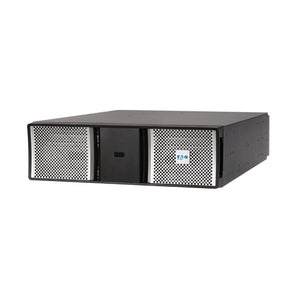
Protect servers, networking equipment, and storage with a rack mount uninterruptible power supply (UPS). Designed for installation in standard IT racks, these systems provide battery backup during outages and help protect connected equipment from power disturbances.
Explore rackmount UPS options for network closets, server rooms and data centres. Compare watt and volt-ampere (VA) ratings, backup runtime, power protection technology and rack dimensions to find a suitable model. Potencia Technologies provides specialist guidance, fast Canada-wide shipping and ongoing service support to help you choose and maintain your backup power solution.
[Shopify product grid and collection filters appear here. Include only models confirmed as rackmount or rack/tower compatible.]
Need help sizing a rack UPS?Contact our team with your equipment load, required runtime, rack dimensions, and site power details.
How to Choose a Rack Mount UPS
The right UPS must meet your equipment’s power requirements, provide sufficient backup time, and fit both your rack and electrical supply. Start with the load you need to protect, then compare the following factors.
Factor
What to check
Capacity
Add your equipment’s watts and VA, allowing headroom for growth. Choose a UPS whose watt and VA ratings both exceed the corresponding load totals.
Power protection
Consider line-interactive technology for relatively stable utility power, or online double-conversion for sensitive equipment and more demanding power conditions.
Rack fit
Check rack width, available rack units (U), chassis depth, mounting rails, weight limits, airflow, and maintenance access.
Runtime
Decide whether you need time for a controlled shutdown, to bridge a brief outage, or to wait for generator power. Check model-specific runtime at your actual load.
Site power
Verify input and output voltage, phase, input plug, output receptacles, and circuit capacity. A 120 V model and a 208 V model are not interchangeable.
Management
Check USB or network monitoring, alerts, and graceful-shutdown compatibility. Confirm whether any required network card is included or sold separately.
Watts measure real power; VA measures apparent power. A higher VA rating alone does not guarantee sufficient watt capacity or longer runtime. For example, compare the actual watt ratings of different 1500 VA rack mount UPS models before choosing one.
An external battery module (EBM) extends runtime on a compatible UPS but does not increase its output capacity. Allow rack space and weight capacity for any additional modules.
Higher-capacity systems may require a dedicated circuit, a different receptacle, or professional installation. Check these requirements before ordering. For help planning power distribution within the rack, explore ourpower distribution units (PDUs).
Rack Mount UPS Systems by Application
Choose backup power around the equipment you need to keep running and the consequences of an interruption.
Network closets: Protect switches, routers, firewalls, and edge equipment. Line-interactive models may suit locations with relatively stable power. Include connected Power over Ethernet loads when calculating requirements.
Server and storage racks: Size for the measured load and required shutdown or continuity time. Consider dual power supplies, shutdown software and remote monitoring when planning protection.
Data centres and critical infrastructure: Assess online double-conversion, bypass arrangements, extended runtime, redundancy and service access. Specialist input helps coordinate the UPS with the wider power infrastructure.
Security and communications: Account for network video recorders, access control and communications equipment, including the supporting network devices needed to keep these systems available.
No single UPS series suits every installation. Your load, power quality, available rack space, and continuity requirements should guide the choice.
Line-Interactive vs Online Rack Mount UPS
UPS topology describes how the system conditions power and supplies connected equipment. Both line-interactive and online models provide battery backup, but their operation differs.
Factor
Line-interactive rack UPS
Online double-conversion rack UPS
Power conditioning
Uses automatic voltage regulation (AVR) to correct many voltage fluctuations without switching to battery.
Converts incoming AC power to DC, then back to AC, continuously conditioning the output.
Transfer to battery
A brief transfer time when battery operation is needed.
Zero transfer time to battery in normal online operation.
Typical applications
Network closets and distributed IT where utility power is relatively stable.
Sensitive or mission-critical equipment and locations with poor power quality.
Cost and efficiency
Generally lower purchase cost and high efficiency.
Typically higher purchase cost; compare efficiency, operating modes and cooling requirements by model.
Choose according to equipment sensitivity, local power conditions and the cost of an interruption. Online protection can be valuable for critical loads, while line-interactive protection may meet the needs of many business installations.
Eaton Rack Mount UPS Options
Eaton offers rackmount and rack/tower options across several UPS families. As an Eaton Certified Power Partner, Potencia can help you compare suitable models and their installation requirements.
Eaton 5P and5PX families include line-interactive options for servers, network closets, and distributed business IT. Check the specific model’s form factor, capacity, and battery configuration.
Eaton 9PX models provide online double-conversion protection, with rack/tower configurations available for more demanding applications. Runtime expansion and monitoring options depend on the model.
Always verify the individual SKU rather than assuming every model in a family has the same mounting, battery, or connectivity features.
Rack Mount UPS FAQs
What is a rack mount UPS?
A rack mount UPS is a battery backup system designed for installation in an IT or server rack, commonly a standard 19-inch rack. It supplies temporary power during an outage and provides power protection for connected servers, storage, networking and other rack-based equipment.
What size rack mount UPS do I need?
Choose a UPS that exceeds both your total watt load and total VA load, with allowance for growth. Then confirm runtime, topology, electrical connections and rack fit. A 3000 VA rack mount UPS may suit some installations, but capacity alone does not establish whether it meets yours.
What is the difference between 1U and 2U rack mount UPS systems?
A rack unit, or U, measures vertical rack space: 1U is 1.75 inches (44.45 mm), while 2U is 3.5 inches (88.9 mm). Height alone does not determine power capacity or runtime. Check chassis depth, weight and mounting hardware as well as available U space.
Is a rack mount UPS better than a tower UPS?
Neither form factor is universally better. Rackmount systems integrate with rack-based equipment, while tower systems suit installations without a rack. A rack/tower model can support either arrangement when installed according to its instructions, using the correct rails, brackets or tower supports.
Should I choose a line-interactive or online rack mount UPS?
Line-interactive models often suit business IT with relatively stable utility power. Online double-conversion models provide continuous power conditioning and zero transfer time to battery in normal online operation. Base your choice on equipment sensitivity, power quality and how much disruption your installation can tolerate.
How long will a server rack UPS run during an outage?
Runtime depends on the model, connected load, battery condition, temperature and any compatible external battery modules. Use the manufacturer’s runtime chart for your expected load and battery configuration. Specify whether you need a controlled shutdown, a short outage bridge or time for a generator to start.
Can an external battery module increase UPS capacity?
No. A compatible external battery module increases battery runtime, not the UPS’s watt or VA output rating. If you add more equipment, recheck output capacity as well as runtime. Confirm module compatibility and allow for its rack space, weight and installation requirements.
Where should a UPS be installed in a server rack?
Heavy UPS systems and battery modules are generally installed low in the rack to improve stability. Follow the rack and UPS manufacturers’ instructions for rails, weight limits, airflow and service access. Ensure the rack is secured appropriately and use suitable lifting assistance when installing heavy equipment.
Get Help Selecting a Rack Mount UPS
Send us your device list or measured watts and VA, required runtime, site voltage and circuit details, input and output connections, and available rack height and depth. Include any monitoring, redundancy or future expansion requirements.